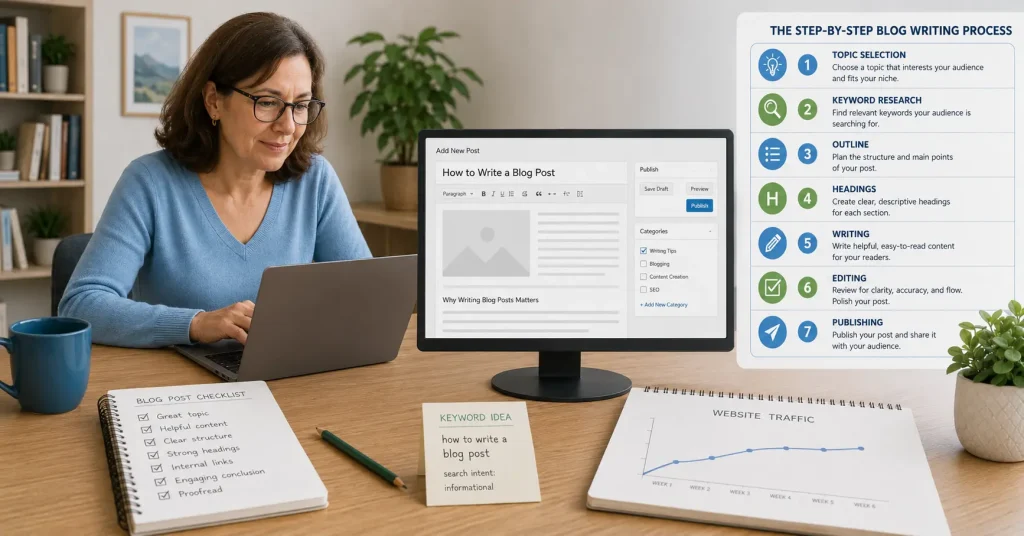

How to Write a Blog Post for Beginners: 11 Easy, Proven Steps
Writing your first blog post can feel harder than it should.
You may have a useful idea but still wonder how to begin, what headings to use or where keywords belong.
The good news is that blog writing is a skill you can improve with a simple process.
This guide explains how to write a blog post for beginners in 11 manageable steps. You will learn how to choose a topic, understand what readers want, create an outline, write clearly, apply basic SEO and prepare the article for publication.
A helpful blog post can answer a question, build trust and attract targeted visitors over time. It is one part of the wider Traffic and Growth strategy, where content, SEO, internal links, email and promotion work together.
Affiliate disclosure: This article may contain affiliate links. If you purchase through one of these links, I may earn a commission at no additional cost to you. I only recommend resources that I believe may be useful for beginners.
What Makes a Good Blog Post?
A good blog post helps a particular reader understand something, solve a problem or take a useful next step.
Strong beginner articles focus on one subject, use clear headings and provide practical advice and a logical next step.
You do not need to sound like an academic or journalist. Clear and useful writing is more important than complicated language.
Step 1: Decide Who the Post Is For
Before writing, picture the person you want to help.
Are they completely new to the topic? What are they trying to achieve, and what is stopping them?
A new blogger and an experienced marketer need different explanations, even when researching the same topic.
For a beginner article, explain unfamiliar terms, use simple examples and divide large tasks into smaller actions.
A short reader statement can keep you focused:
This article is for new bloggers who want a straightforward process for planning, writing and publishing a useful post.
Step 2: Choose One Clear Topic
One blog post should have one main purpose.
Trying to cover blogging, social media, email marketing, affiliate programs and website design in one article usually creates a shallow and confusing result.
Choose a narrower topic that can be answered properly. Instead of writing about “blogging,” you might write about creating a blog outline, choosing a topic, writing an introduction or improving an existing post.
Your wider content marketing strategy should help you choose topics that support your audience and website pillars.
Step 3: Research a Focus Keyword and Search Intent
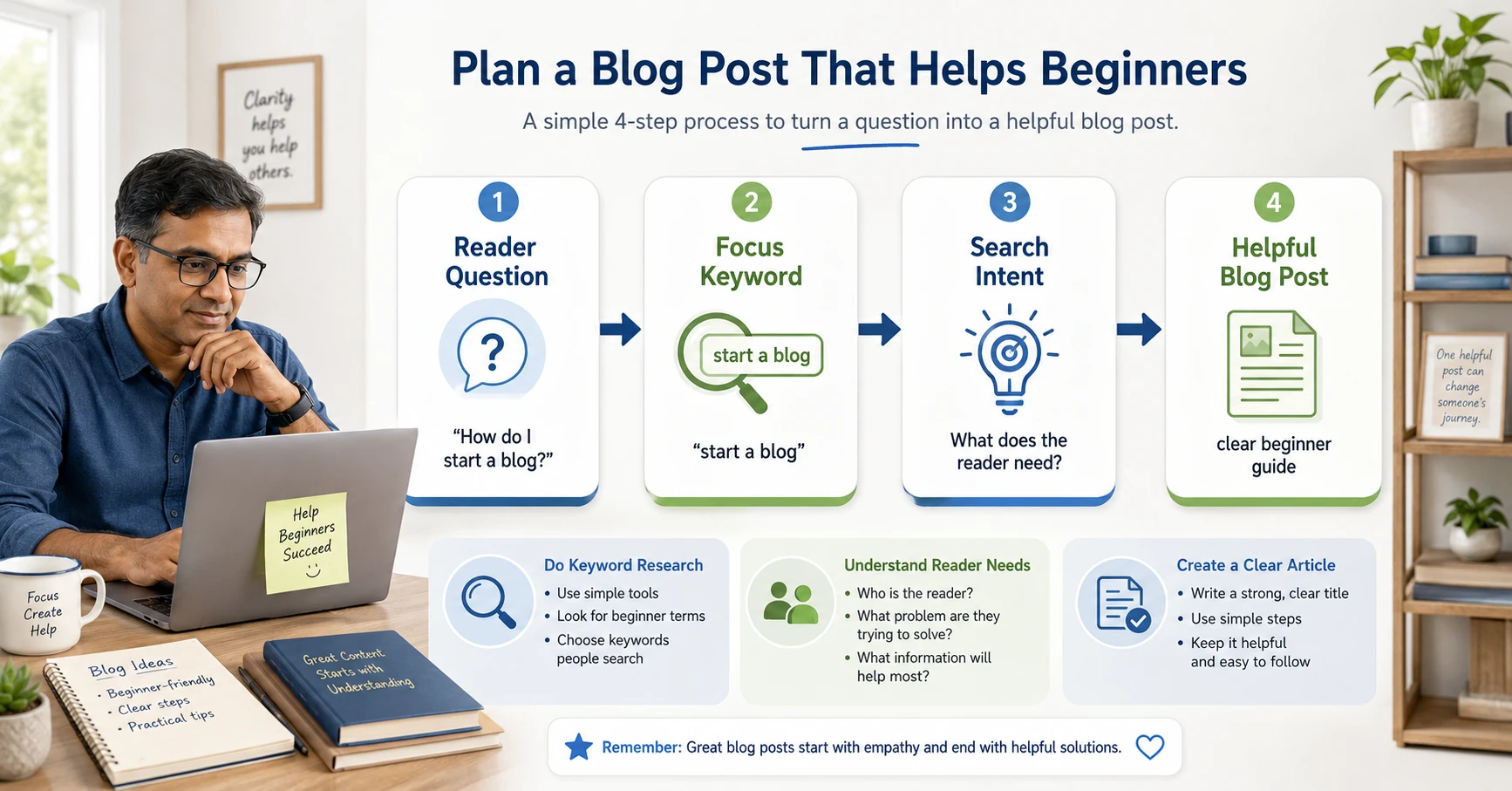
A focus keyword is the main search phrase your article targets.
Keyword research can show how people describe their questions and whether a topic is too broad or competitive. The phrase must also match your audience and website purpose.
For this article, the focus keyword is how to write a blog post for beginners.
Supporting phrases include:
- how to write a blog post;
- blog post outline;
- blog post template;
- blog post structure;
- how to write a blog post for SEO; and
- blog writing tips for beginners.
Next, consider search intent: what does the person actually want?
Someone using the focus keyword probably wants a step-by-step process, a clear structure and practical advice. They do not need an advanced technical discussion.
Use a keyword research guide to find ideas, but always write for the person behind the search.
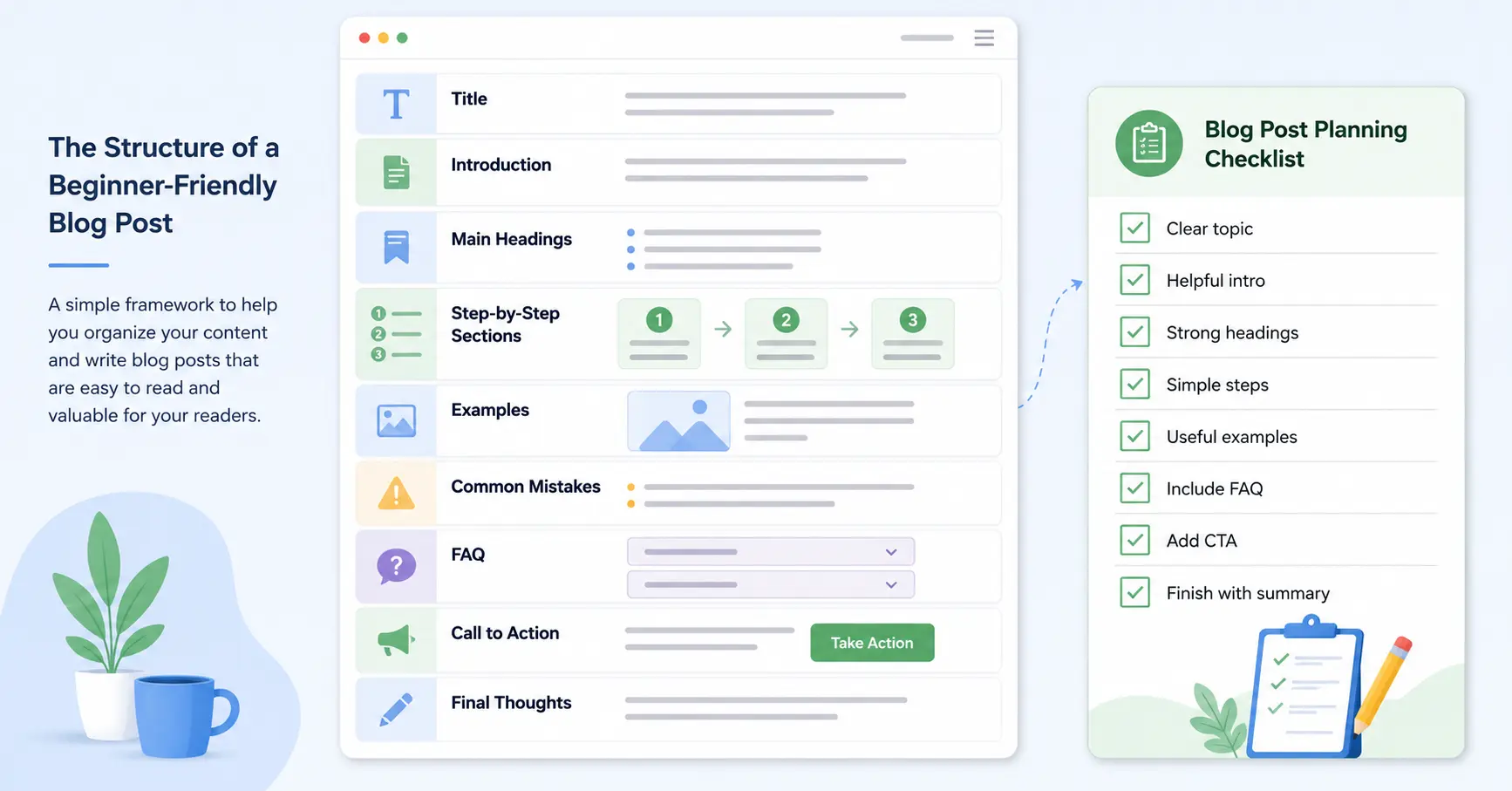
Step 4: Create a Simple Blog Post Outline
An outline gives your article direction before you start writing full paragraphs. Learning how to write a blog post outline before drafting can save time and help you organise your ideas in the right order.
Begin with the main question, list the smaller questions a beginner needs answered and arrange them in a logical order.
A basic outline could contain:
- Introduction
- Explanation of the topic
- Step-by-step instructions
- Examples or tips
- Common mistakes
- Frequently asked questions
- Call to action
- Final thoughts
The outline does not need to be perfect. It prevents repetition, missing sections and ideas appearing in the wrong order.
It is easier to change five headings in an outline than to reorganise a completed draft.
Step 5: Write a Clear, Specific Title
Your title should tell readers what the article will help them do.
A vague title such as “My Thoughts About Blogging” gives people little reason to click. A stronger title makes the subject and benefit clear.
For example:
- Weak: Writing Better Content
- Better: How to Write a Blog Post for Beginners
- Stronger: How to Write a Blog Post for Beginners: 11 Easy, Proven Steps
Numbers can make a process feel organised. Words such as “easy,” “practical” or “proven” can communicate a benefit when the article genuinely delivers it.
Avoid exaggerated promises. Do not suggest guaranteed traffic, rankings or income.
Step 6: Make the Introduction Useful
The introduction should quickly confirm that the reader is in the right place.
A simple introduction can identify the problem, explain why it matters, describe what the post covers and give the reader a reason to continue.
Avoid spending several paragraphs talking around the subject. People often scan an article before deciding whether to read it, so address the main question early.
Use the focus keyword naturally near the beginning, but do not force it into every paragraph.
Step 7: Use Headings, Short Paragraphs and Examples
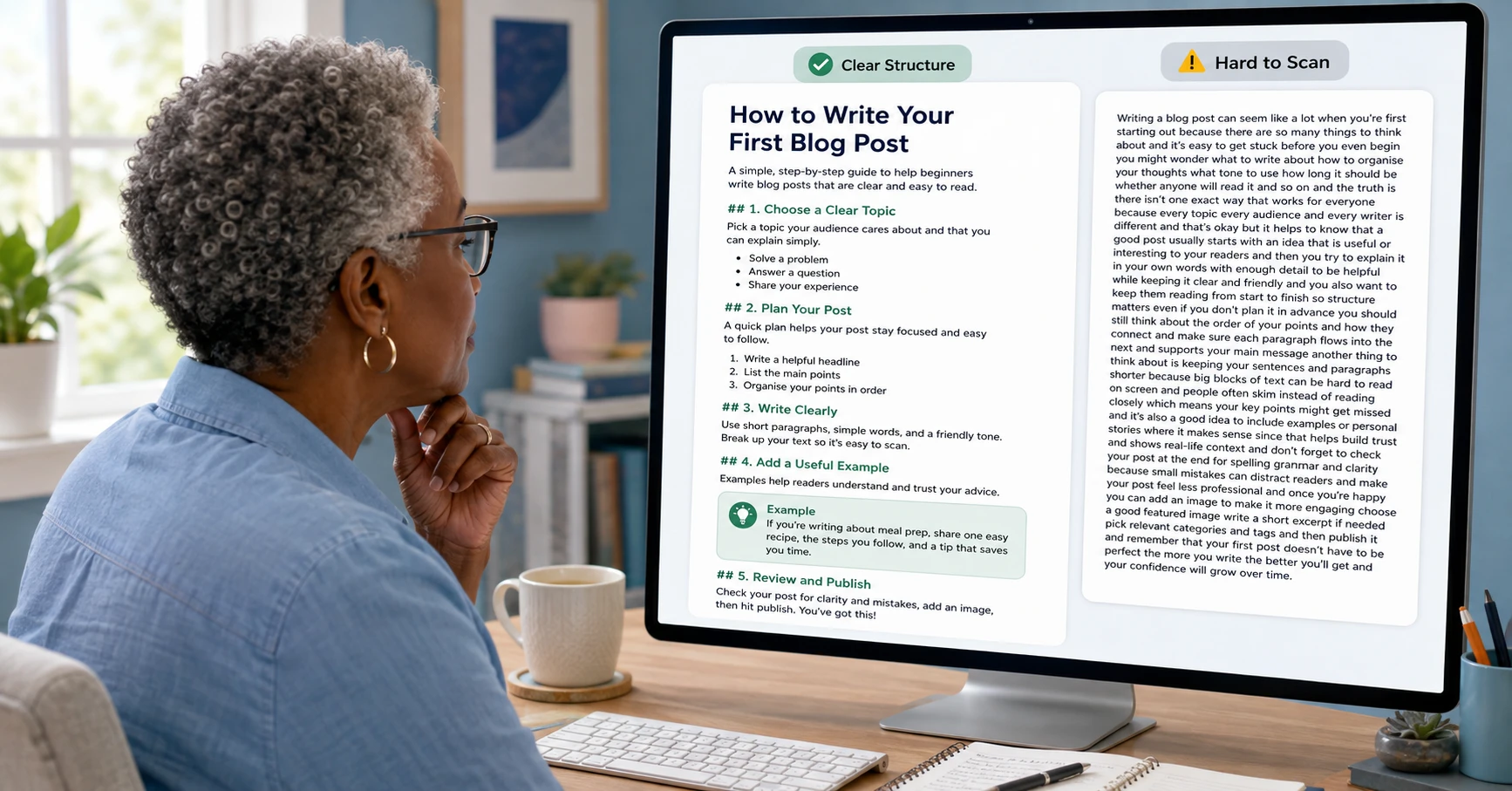
Online readers often skim before reading closely.
Make the article easier to follow with one H1 title, H2 headings for main sections, H3 headings for smaller points, short paragraphs, numbered steps and occasional bullet lists.
Headings should describe the information below them. “Create a Simple Blog Post Outline” is more useful than “Getting Organised.”
Examples turn general advice into something readers can picture and apply.
Avoid large blocks of text that look difficult to read on a phone or computer screen.
Step 8: Write to Help, Not Just to Fill Space
There is no perfect word count for every post.
An article should be long enough to answer the question properly and no longer than necessary. A focused 1,400-word guide can be more useful than a repetitive 3,000-word article.
Add value with clear explanations, practical steps, examples, relevant experience, reliable sources and a sensible next action.
Google recommends creating helpful, reliable, people-first content. The main purpose should be helping the reader rather than merely attracting search visits.
Before moving on, ask:
Will a beginner know what to do after reading this section?
When the answer is no, add a clearer explanation or example.
Step 9: Apply Basic On-Page SEO
SEO helps search engines and readers understand your page, but it should not make the writing sound unnatural.
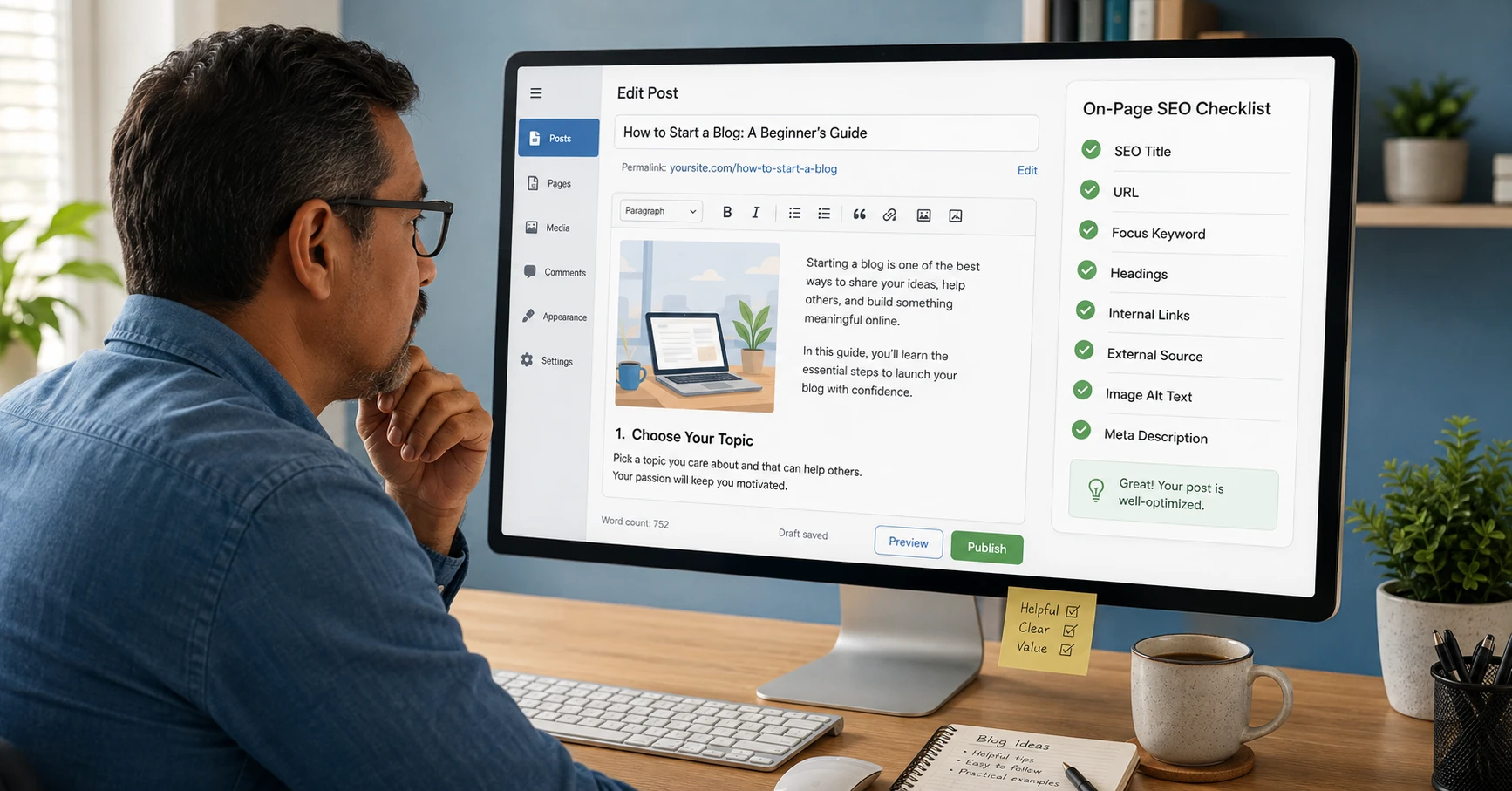
Use the focus keyword sensibly in the SEO title, URL, H1 heading, introduction, meta description, featured-image alt text and body content. Include related terms where they fit naturally rather than repeating the exact phrase.
Also:
- create a short, descriptive URL;
- link to relevant internal pages;
- include one trustworthy external source;
- name images clearly;
- write accurate image alt text;
- use a logical heading order; and
- check the page on mobile.
The SEO for Beginners guide covers the wider foundations. Use the On-Page SEO Checklist before publishing. Understanding how to write a blog post that ranks is not about repeating keywords. It means answering the search properly, organising the content clearly and making the page useful for readers.
Step 10: Edit the Draft Before Publishing
Your first draft does not need to be perfect. Its job is to get the ideas onto the page.
Editing is where you improve them.
Check whether the introduction matches the article, every section supports the main topic and any points are repeated. Shorten awkward sentences, explain unfamiliar words, verify claims, test links and correct spelling and grammar.
Reading the article aloud can reveal sentences that look acceptable but sound unnatural.
When possible, leave some time between drafting and editing. Returning with fresh eyes often makes problems easier to notice.
Step 11: Publish, Link, Promote and Improve
When learning how to write a blog post in WordPress, use the preview function to check your headings, images, links and mobile layout before publishing. Publishing is not the final step.
After the post goes live:
- Link to it from the relevant pillar page.
- Add links from older related articles.
- Share it through your chosen social platform.
- Send it to your email list.
- Check that Google can discover the page.
- Review impressions and clicks over time.
- Update the article when information changes.
Internal links help readers continue learning and show how your pages relate. This post should link to the Traffic and Growth pillar, and the pillar should link back to this post. 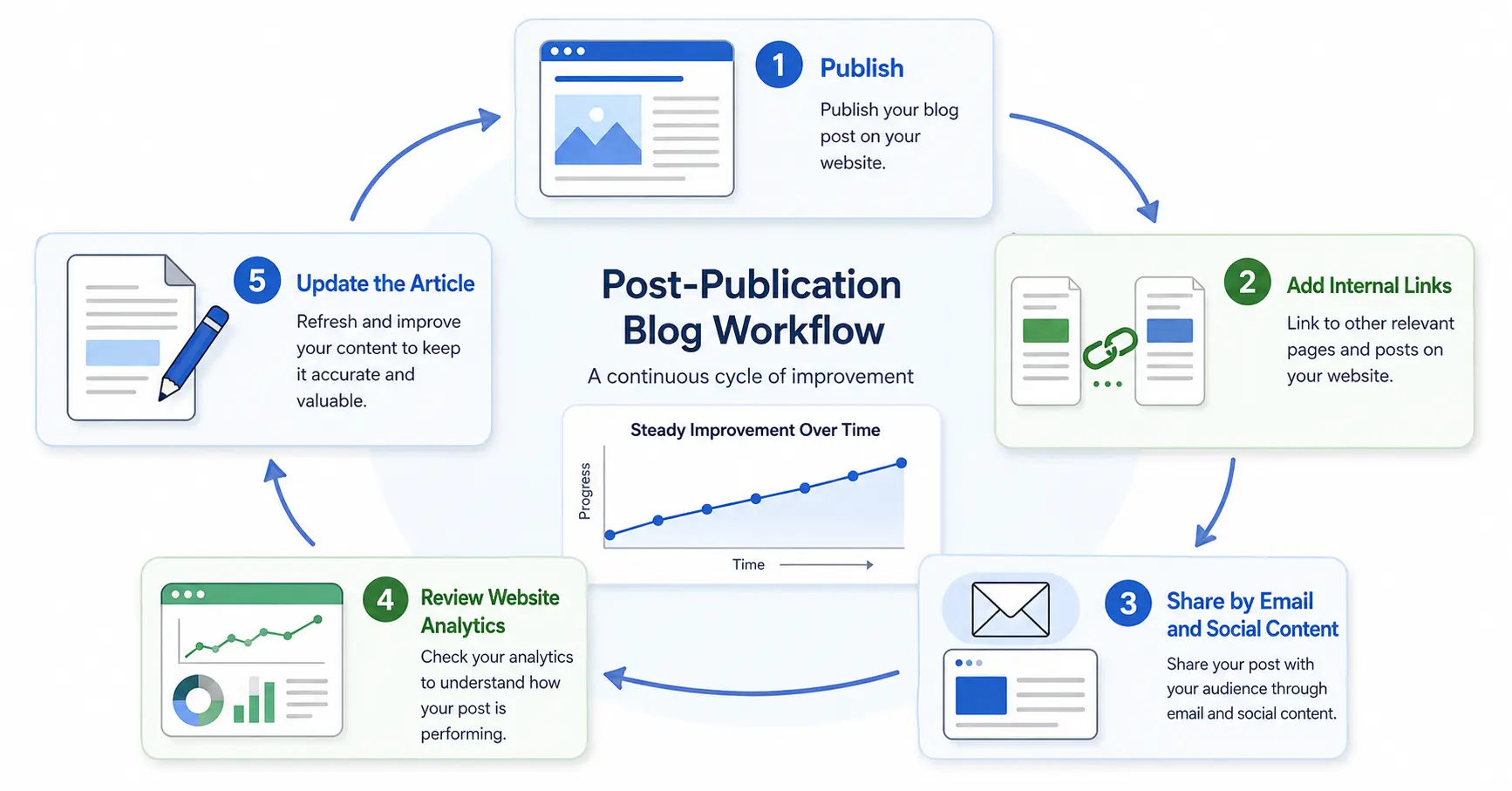
Learn more about the connection between content and search visibility in How Blog SEO Helps Posts Get More Traffic.
A Simple Blog Post Template for Beginners
Use this template when you feel unsure where to begin:
Examples and tips: Show how the advice works.
FAQ: Answer related questions briefly.
Call to action: Suggest one useful next step.
Final thoughts: Summarise the lesson and encourage action.
A template removes the pressure of facing a blank page. You can adapt it for tutorials, checklists, comparisons and reviews.
Want More Help Building Your Online Business?
Writing useful blog posts is easier when you understand how content, traffic and affiliate marketing fit together.
For additional beginner-friendly training and resources, explore CB Profit Club and decide whether it matches the stage you are at now.
Start with one useful article, publish it carefully and improve your process with every post.
Common Blog Writing Mistakes to Avoid
Common beginner mistakes include choosing a topic that is too broad, writing without understanding the reader, ignoring search intent, using vague headings, repeating points, forcing keywords and publishing without editing.
Other problems include forgetting internal links, providing no next step and expecting immediate traffic from one article.
You do not need to avoid every mistake on your first attempt. Use a repeatable process and improve over time.

How long should a beginner blog post be?
How long does it take to write a blog post?
How often should a beginner publish blog posts?
Can I write a blog post without being an expert?
Should I use AI to write blog posts?
How many keywords should I use in a blog post?
Final Thoughts
Learning how to write a blog post for beginners becomes easier when you stop treating it as one large task.
Choose one reader and one topic. Research the keyword and search intent. Build an outline. Write clear sections, add useful examples, apply basic SEO and edit before publishing.
Then connect the article to the rest of your website.
For the complete system behind content, SEO, internal links, email and promotion, continue with the Traffic and Growth guide.
Your first post does not need to be perfect. It needs to be useful, accurate and published. The next one can be better.
Continue Your Online Business Journey
Explore more resources to help you build and grow your online business.
Recommended Reading
New Here?
Start with the beginner roadmap and learn the fundamentals of affiliate marketing and online business.
Start HereReady For The Next Step?
Discover the complete system I use to build and grow an online business.
Join Profit Club