
On-Page SEO Checklist for Beginners
Publishing helpful content is an important part of growing a website, but writing the article is only one part of the process.
You also need to make sure the page is clear, well organised and easy for search engines to understand.
That is where on-page SEO comes in.
This on-page SEO checklist for beginners gives you a simple process for reviewing your title, headings, URL, content, links and images before you publish. It can help you create clearer, better-optimised pages without making SEO feel overly technical.
You do not need to be an SEO expert or use complicated tools.
This basic on-page SEO checklist explains how to do on-page SEO before publishing or updating a blog post.
By following a few practical steps, you can improve the reader’s experience, give search engines stronger signals about the topic and publish each article with greater confidence.
The goal is not to force keywords into every paragraph… It is to create a useful, easy-to-read page that answers the reader’s question clearly.
Affiliate disclosure: This article may contain affiliate links. If you purchase through one of these links, I may earn a commission at no additional cost to you. I only recommend resources that I believe may be useful for beginners.
What Is On-Page SEO?
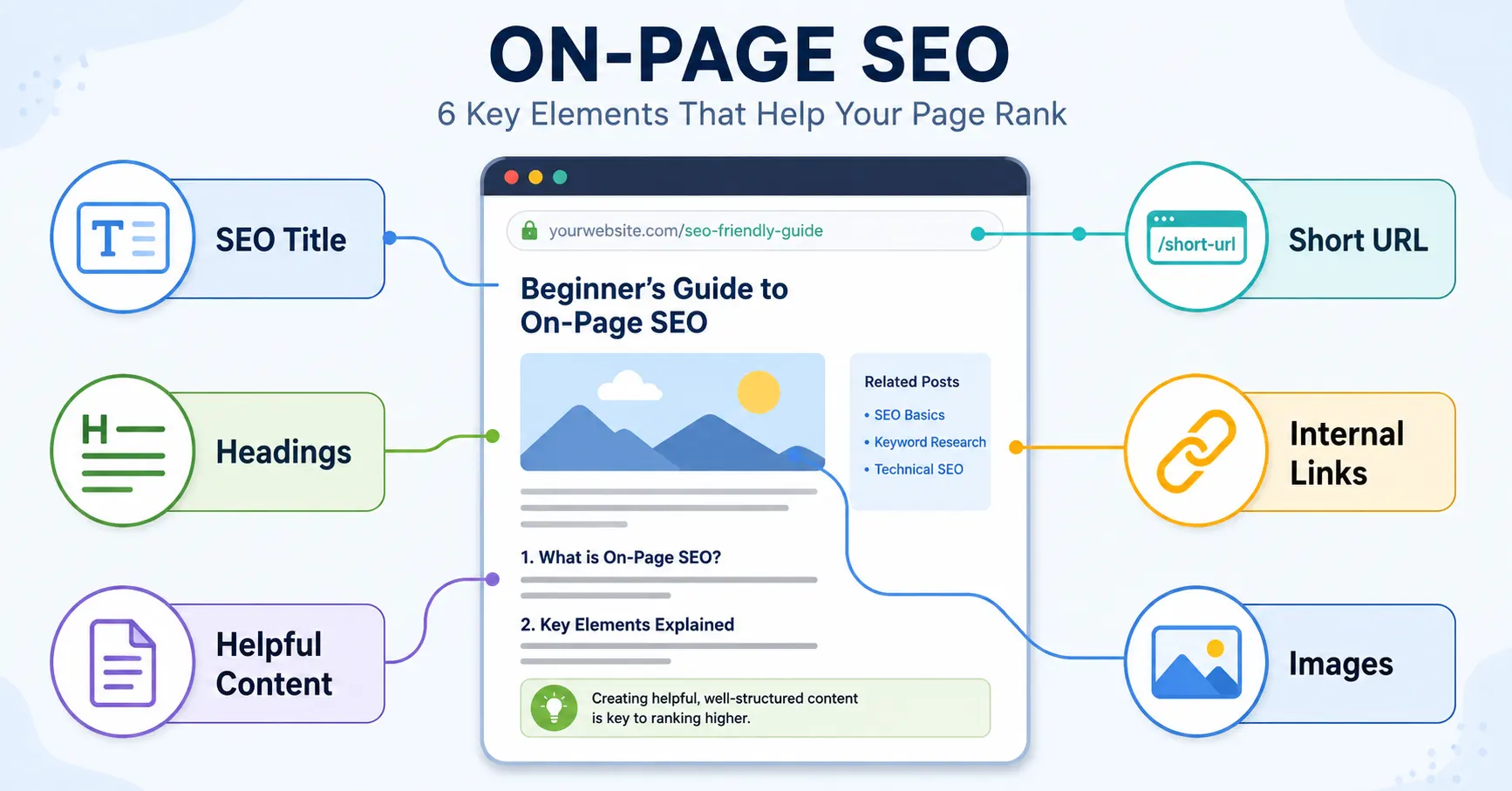
On-page SEO is the process of improving an individual webpage so that it is easier for readers and search engines to understand.
It focuses on elements you can control on the page, including:
- The topic of the article
- The page title
- The headings
- The written content
- The page URL
- Internal and external links
- Images and alt text
- The meta description
- The overall reading experience
On-page SEO is different from off-page SEO, which generally involves signals outside your website, such as backlinks and brand mentions.
It is also slightly different from technical SEO, which deals with matters such as website speed, mobile usability, crawling and indexing.
These areas often overlap, but on-page SEO is usually the easiest place for beginners to start.
Why On-Page SEO Matters
Search engines need to understand your page before they can decide when it may be useful to someone conducting a search.
A page with a clear title, organised headings, relevant content and descriptive links provides stronger context than a page with no obvious structure.
Good on-page optimisation can also improve the reader’s experience.
Visitors can quickly understand:
- What the page covers
- Whether it answers their question
- Where to find important information
- What related topic to read next
On-page SEO does not guarantee high rankings. Competition, website authority, content quality, search intent and backlinks can all influence results.
However, completing the basic checks gives your content a much stronger foundation. Read SEO for beginners first if you need a broader explanation of crawling, indexing, keywords and search intent.
1. Choose One Clear Focus Keyword
Begin by choosing one main search phrase for the page.
The focus keyword should describe the primary subject of the article. For this post, the focus keyword is on-page SEO checklist.
Your focus keyword helps keep the article centred on one clear topic.
Avoid targeting several unrelated keywords on the same page. Trying to cover too many different searches can make the article unfocused and difficult to organise.
Supporting keywords can be included naturally, but they should remain closely connected to the main topic.
For example, suitable supporting phrases for this article include:
- on-page SEO
- on-page SEO checks
- SEO-friendly URLs
- internal links for SEO
- image alt text
- SEO titles and meta descriptions
Still deciding which phrase to target? Learn how to find long-tail keywords before completing the rest of your on-page SEO checks.
These phrases expand the topic without changing its main purpose.
2. Understand the Search Intent
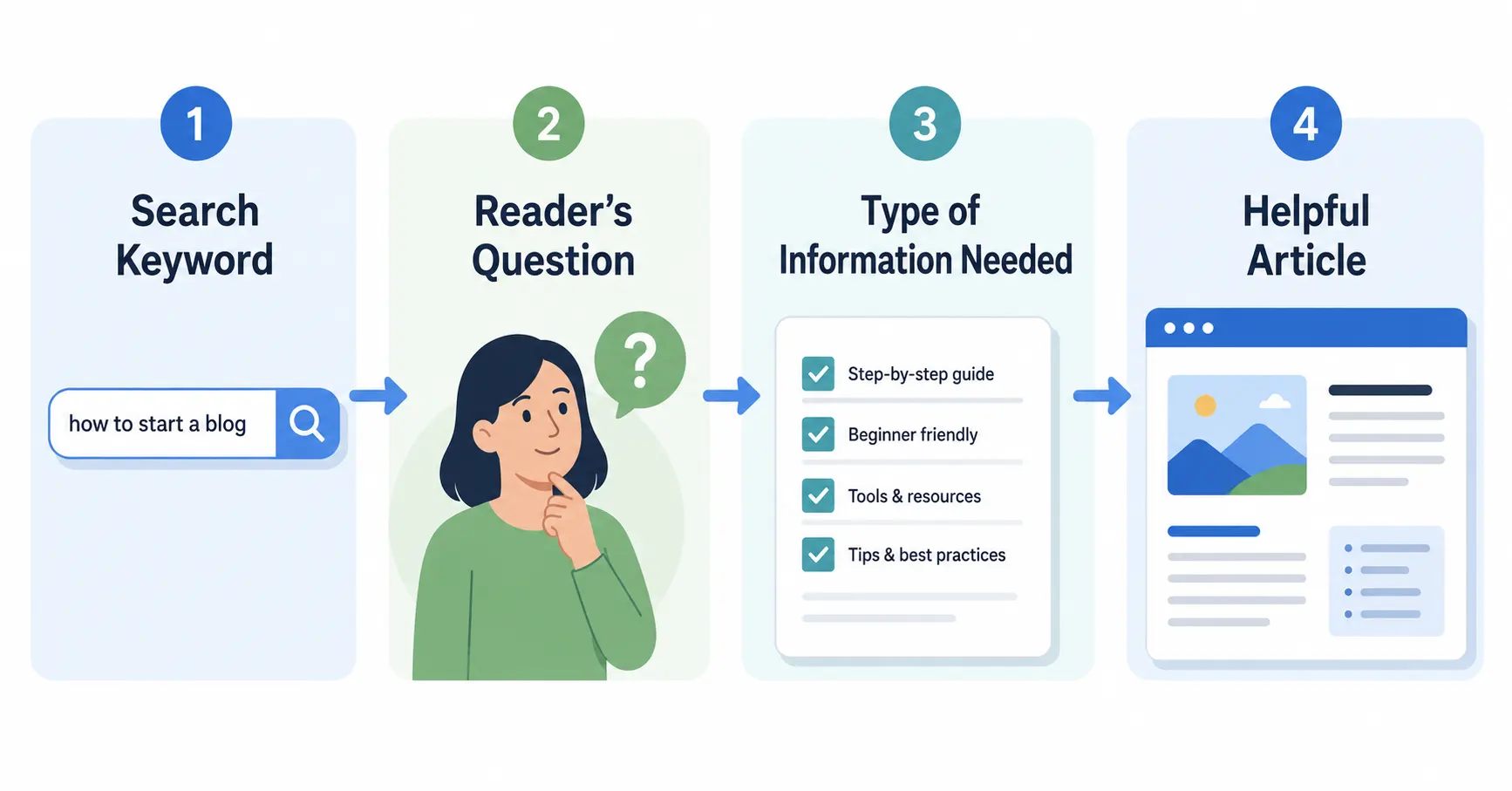
Search intent is the reason behind a search.
Someone searching for an on-page SEO checklist probably wants a practical list they can follow while creating or reviewing a webpage.
They are unlikely to want a highly technical history of search engine optimisation.
Before writing, ask:
- What does the searcher want to accomplish?
- Are they looking for information, instructions or a product?
- What would make the page genuinely useful?
- What format would be easiest to follow?
For this topic, a numbered checklist with explanations is more useful than a long article containing only general SEO theory.
Matching search intent helps you create content that satisfies the reader rather than simply repeating a keyword.
Before choosing your title and page format, use this search intent guide for beginners to confirm what type of answer the reader expects.
3. Write a Clear SEO Title
The SEO title is the title that may appear in search results and browser tabs.
It should describe the page clearly and encourage the right reader to click.
A good SEO title normally:
- Includes the focus keyword
- Explains what the reader will receive
- Matches the content on the page
- Avoids misleading or exaggerated promises
- Is concise enough to display clearly
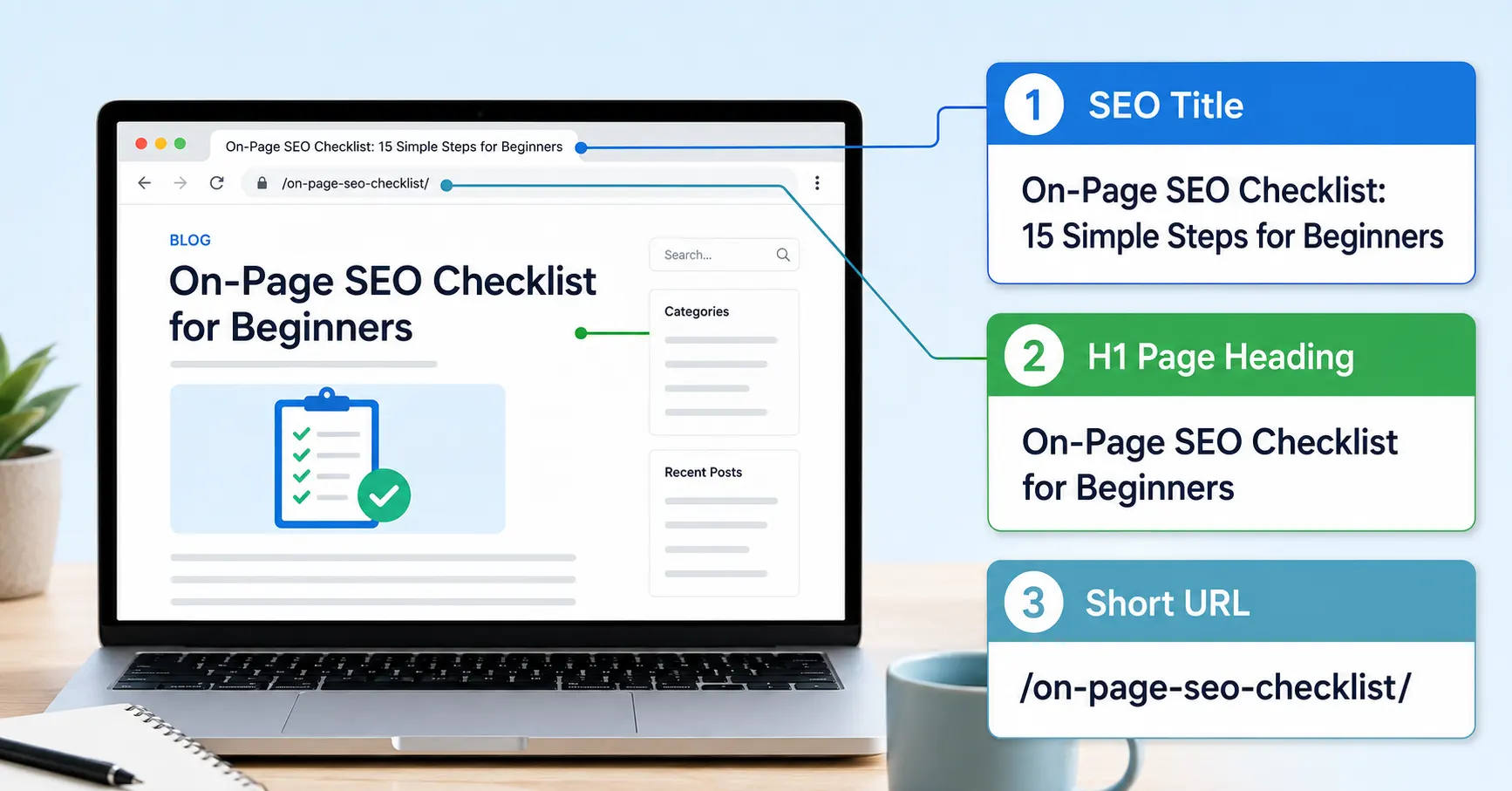
The recommended SEO title for this article is:
Valuable On-Page SEO Checklist: 15 Simple Steps for Beginners
The keyword appears near the beginning, while “15 Simple Steps for Beginners” explains the format and intended audience.
Your SEO title and visible page heading can be similar. They do not have to be identical, but they should describe the same subject.
4. Create a Short, Descriptive URL
The page URL should be simple and easy to understand.
A suitable URL for this post is:
/on-page-seo-checklist/
Avoid URLs containing unnecessary dates, numbers or unrelated category names.
For example, this is harder to understand:
/blog/category-7/post-248-on-page-checklist-2026/
A short URL is easier to read, share and remember.
It also allows the article to remain useful in future years without the URL appearing outdated.
5. Include the Keyword in the Main Heading
Your H1 is the main visible heading on the page.
Most articles should have one clear H1 that explains the page’s primary topic.
For this article, the H1 is:
On-Page SEO Checklist for Beginners
Including the focus keyword in the main heading confirms the topic immediately.
Do not create several H1 headings throughout the article. Use H2 and H3 headings to divide the remaining content into sections.
6. Use Helpful H2 and H3 Headings
Headings make longer articles easier to scan. A practical blog post structure helps you arrange those headings in a logical order.
Many readers will look through the headings before deciding whether to read the full page.
Use H2 headings for major sections and H3 headings for smaller points within those sections.
Headings should describe the information that follows. Avoid vague headings such as “More Information” or “Things to Know” when a more descriptive heading is possible.
You can include supporting keywords in some headings when they fit naturally.
However, every heading does not need to contain your main keyword.
Clear organisation is more important than keyword repetition.
7. Use the Focus Keyword Naturally
Include your focus keyword in important areas of the page, such as:
- The SEO title
- The H1 heading
- The URL
- The introduction
- At least one subheading where appropriate
- The meta description
- The image alt text when relevant
- The main body of the article
This does not mean repeating the exact phrase in every paragraph.
Use natural variations such as:
- on-page optimisation
- on-page SEO checks
- optimising an individual webpage
- basic SEO checklist
- page optimisation
Search engines can usually understand closely related terms and context.
Your writing should sound as though it was created for a person, not assembled around a keyword quota.
8. Answer the Main Question Early
Readers should not have to work through a long introduction before understanding the page.
Use the opening section to explain:
- What the topic is
- Why it matters
- What the article will help the reader do
For example, this article explains what on-page SEO means and then provides a practical checklist.
Answering the main question early reassures the visitor that they have found a relevant page.
It also prevents introductions from becoming overly long or filled with unnecessary background information.
9. Create Helpful, Original Content
SEO cannot rescue content that does not help the reader. Follow this guide to write blog posts that get traffic without sacrificing clarity or usefulness.
Your article should provide useful information, clear explanations and practical next steps.
Before publishing, ask:
- Does the article answer the main question?
- Is any important step missing?
- Could a beginner follow the instructions?
- Have vague statements been explained?
- Does the page offer something more useful than a brief definition?
Original content does not mean that no one has ever discussed the topic before.
It means presenting the information clearly, adding your own explanations and creating a page that genuinely supports your audience.
Avoid copying sections from competing pages or lightly rewriting another website’s checklist.
Google recommends creating people-first content that is useful, reliable and written to benefit readers rather than content created mainly to influence search rankings.
You can learn more in Google’s SEO Starter Guide.
10. Add Relevant Internal Links
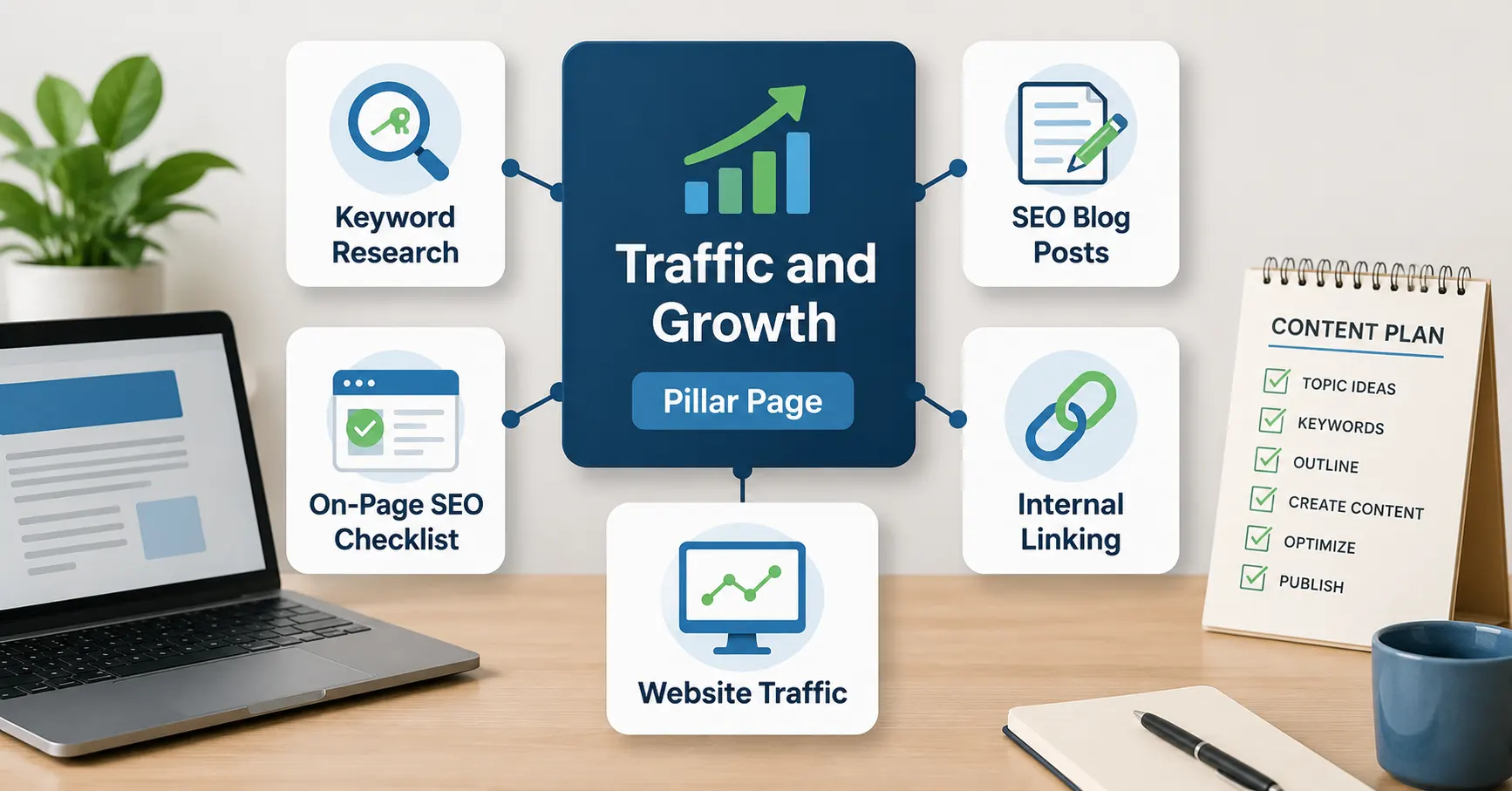
Internal links connect one page of your website to another. The article on how blog SEO helps posts get traffic explains why those pathways support discovery and topic context.
They help readers discover related information and help search engines understand how your pages are connected.
For example, this article supports the broader Traffic and Growth for Beginners pillar page.
The pillar page introduces the larger subject, while this supporting article examines one specific part of SEO in more detail.
You can also link to related articles about:
- Keyword research
- Writing SEO blog posts
- Internal linking
- Increasing website traffic
- Creating a content plan
Use descriptive anchor text. Instead of writing “click here,” describe what the linked page covers.
For example:
Learn how to increase website traffic
is more descriptive than:
Click here to learn more
Do not add internal links simply to increase their number. Each link should help the reader continue their journey.
11. Link to Reliable External Sources When Helpful
External links point from your article to another website.
They can be useful when you need to reference:
- Official documentation
- Research
- Statistics
- Industry guidelines
- A tool mentioned in the article
Choose reliable, relevant sources.
You do not need to add an external link to every section. Add one when it supports a statement or gives the reader access to useful additional information.
Open external links in a new tab only when it improves the experience. Avoid sending readers through a long chain of unnecessary sources.
12. Optimise Your Images
Images can make an article easier to understand, especially when explaining a process or checklist.
Before uploading an image:
- Resize it to suit the page
- Compress the file
- Use a descriptive filename
- Choose an efficient format such as WebP
- Add appropriate alt text
- Avoid uploading images much larger than required
A filename such as:
on-page-seo-checklist.webp
is more useful than:
IMG_4827.webp
Alt text should briefly explain the image for visitors who cannot see it.
For example:
On-page SEO checklist showing titles, headings, URLs, links and images
Avoid forcing keywords into alt text when they do not describe the image.
13. Write a Useful Meta Description
The meta description is a short summary that may appear beneath the title in search results.
It should explain what the page offers and encourage an appropriate reader to visit.
The suggested meta description for this article is:
Use this on-page SEO checklist to optimise your titles, headings, content, URLs, images and internal links with simple beginner-friendly steps.
A meta description is not a direct guarantee of better rankings, and search engines may display different text from the page.
Even so, writing a clear description gives you a better opportunity to present the article accurately.
14. Improve Readability
A page may contain excellent information and still be difficult to read.
Improve readability by using:
- Short paragraphs
- Descriptive headings
- Lists where appropriate
- Direct language
- Clear examples
- Enough white space
- A readable font size
Avoid turning every sentence into a separate paragraph, but also avoid large blocks of text.
For a beginner audience, explain technical language when it first appears.
Read the article aloud before publishing. Awkward sentences and repeated words are often easier to notice when spoken.
15. Review the Page After Publishing
On-page SEO is not necessarily finished when the article is published.
Return to the page occasionally and review:
- Whether the information is still accurate
- Whether links still work
- Whether the article matches search intent
- Whether related articles can be added
- Whether the page is receiving impressions or clicks
- Whether sections need clearer explanations
- Whether new questions should be included
Do not make major changes every few days because a page has not ranked immediately.
SEO often takes time, particularly for a newer website.
Use performance data to guide improvements rather than changing the article based only on guesswork.
Once your page is optimised, continue with these organic website traffic strategies for beginners.
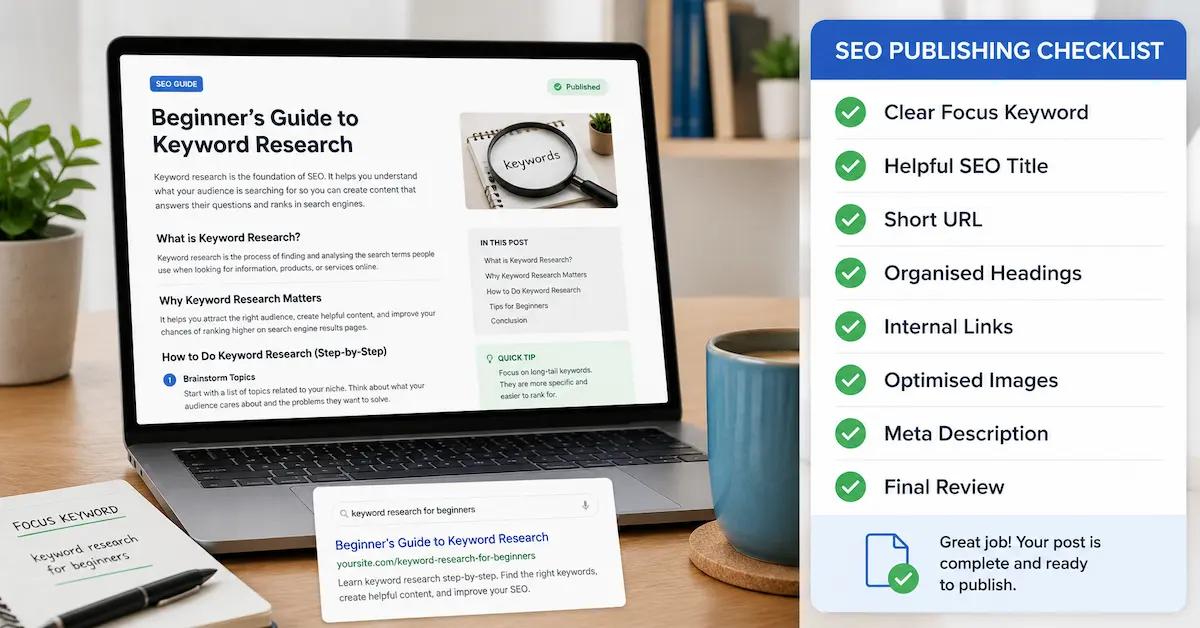
Quick On-Page SEO Checklist
Use this checklist for on-page SEO whenever you publish a new article or update an existing page. It can help you catch small issues before they affect readability, relevance or search visibility.
Before publishing a blog post, check the following:
- Choose one clear focus keyword
- Understand the search intent
- Add the keyword to the SEO title
- Create a short, descriptive URL
- Use one clear H1 heading
- Organise the article with H2 and H3 headings
- Include the keyword and related phrases naturally
- Answer the reader’s main question early
- Create helpful, original content
- Add relevant internal links
- Link to reliable external resources when necessary
- Compress and describe your images
- Write a useful meta description
- Improve readability
- Review and update the page over time
You do not need to complete these steps perfectly.
The objective is to make each page clearer, more useful and easier to understand than it was before.
Take the Next Step with CB Profit Club
Learning individual SEO techniques is helpful, but applying everything consistently can be more difficult.
CB Profit Club can help you move from reading about online marketing to following a clearer, more structured plan.
Inside Pro Club, you can continue building your knowledge, work through practical training and develop the skills needed to grow your online business with greater confidence.
Learn more about Pro Club and see what is included.
Frequently Asked Questions
What is included in an on-page SEO checklist?
An on-page SEO checklist normally covers the focus keyword, search intent, SEO title, headings, URL, written content, internal links, images, alt text, meta description and readability. It may also include basic checks for mobile usability and page speed.
How many times should I use my focus keyword?
There is no fixed number that works for every article. Include the keyword in important places such as the title, H1, introduction, URL and meta description, then use it naturally throughout the content. Avoid repeating it when a variation would read more clearly.
Is on-page SEO enough to rank a website?
On-page SEO provides an important foundation, but it is not the only ranking consideration. Content quality, competition, backlinks, website authority, technical performance and how well the page satisfies search intent can also affect visibility.
Should I complete on-page SEO before publishing?
Complete the main checks before publishing, including the title, headings, URL, internal links, images and meta description. You can then return to the article later to update information, add relevant links and improve sections using performance data.
Do I need an SEO plugin for on-page SEO?
An SEO plugin can make WordPress on-page SEO easier by helping you edit titles, meta descriptions, URLs and other page settings. However, a plugin cannot decide whether your content is genuinely helpful. You still need to understand search intent, choose a clear focus keyword and create useful content for the reader.
What is the difference between on-page SEO and technical SEO?
On-page SEO focuses on the content and elements of a particular webpage, such as headings, titles, links and images. Technical SEO focuses more broadly on how the website functions, including crawling, indexing, mobile usability, structured data and website speed.
Final Thoughts
On-page SEO can appear complicated when every possible ranking factor is discussed at once.
For most beginners, the best approach is to concentrate on the essentials.
- Choose a clear topic.
- Understand what the reader wants.
- Write a descriptive title.
- Organise the article with useful headings.
- Add relevant links.
- Optimise the images and make the content easy to read.
Most importantly, create a page that genuinely helps the visitor. A consistent content marketing strategy helps you apply this checklist across a connected group of useful articles.
Use this on-page SEO checklist whenever you publish a new article or update an existing one. Over time, the process will become a natural part of creating content.
Next step:
On-page optimisation is only one part of building sustainable traffic. Visit the Traffic and Growth for Beginners pillar page to explore keyword research, helpful content, internal linking and other practical ways to grow your website.
Continue Your Online Business Journey
Explore more resources to help you build and grow your online business.
Recommended Reading
New Here?
Start with the beginner roadmap and learn the fundamentals of affiliate marketing and online business.
Start HereReady For The Next Step?
Discover the complete system I use to build and grow an online business.
Join Profit Club